> ## Documentation Index
> Fetch the complete documentation index at: https://docs.root.io/llms.txt
> Use this file to discover all available pages before exploring further.
# CVE Details
> Deep-dive into any CVE to see affected assets, patch status, and Root's remediation timeline.
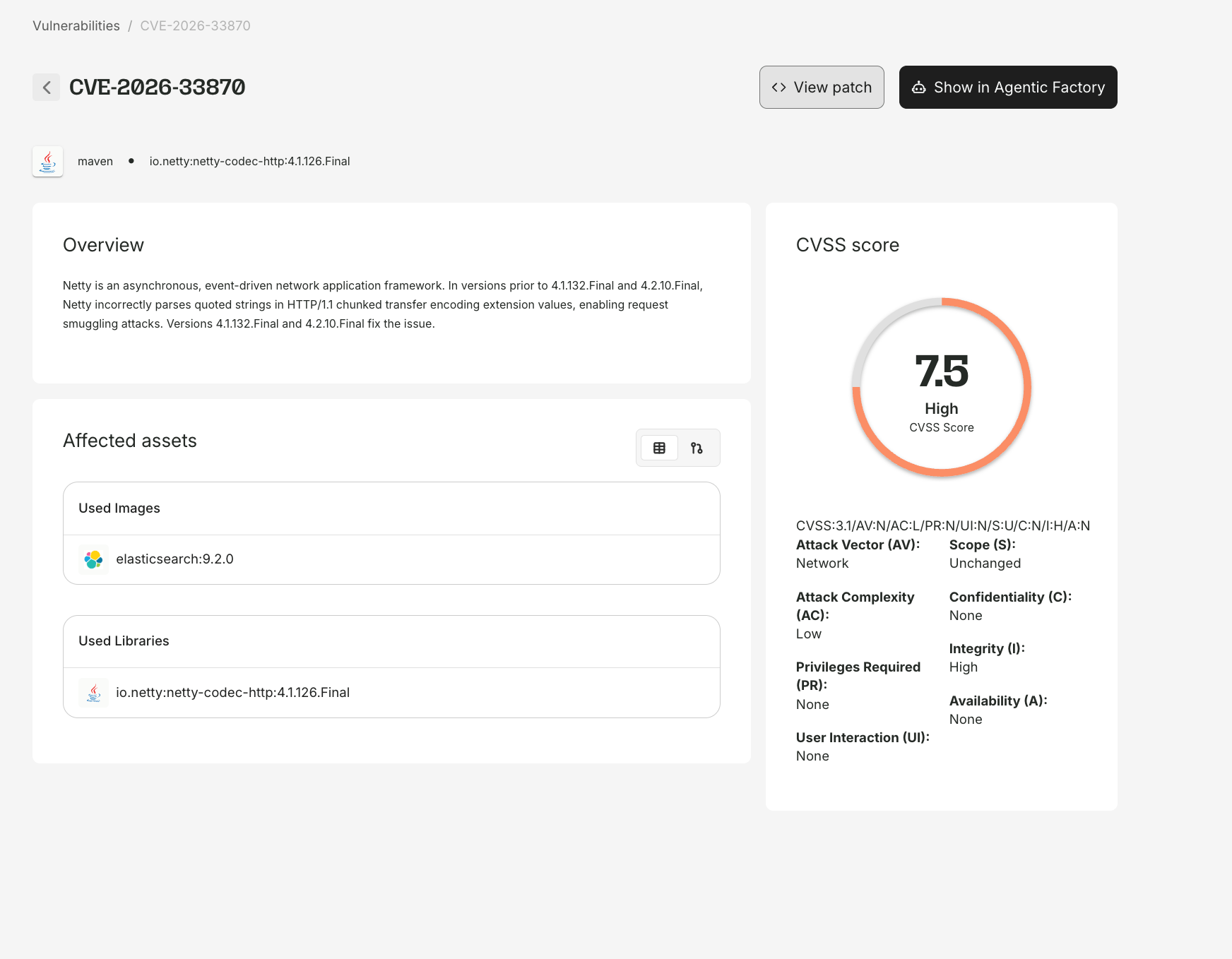
The CVE Details page gives you a comprehensive view of any vulnerability - severity, affected assets, patch status, and the full remediation timeline. Access it by clicking any CVE ID throughout the platform.
 ## CVE metadata
The top of the page shows:
| Field | Description |
| ------------------- | ----------------------------------- |
| **CVE ID** | e.g., CVE-2024-45492 |
| **Severity** | Critical, High, Medium, or Low |
| **CVSS Score** | Numeric score and vector string |
| **Description** | Summary of the vulnerability |
| **Published date** | When the CVE was publicly disclosed |
| **Discovered date** | When Root first detected it |
## Patch status and actions
If Root has generated a patch, two action buttons appear:
* **Show Patch** - view the actual code diff
* **Show in Agentic Factory** - open the animated [Agentic Patching](/platform/agentic-patching) flow
These buttons appear only for CVEs with Root-generated patch artifacts. CVEs resolved by upstream fixes show resolution status without patch artifacts.
## Remediation statuses
| Status | Meaning |
| ---------------------- | -------------------------------------------------------------------- |
| **Fixed** | Root has resolved this CVE. A patched package or image is available. |
| **Working on a Patch** | Root's agents are actively generating a fix. |
| **No Fix Available** | No applicable fix exists. Root continues monitoring. |
## SLA tracking
| SLA Status | Meaning |
| -------------------- | -------------------------------- |
| **Met** | Resolved within the SLA window |
| **X days remaining** | Actively being worked within SLA |
| **X days past SLA** | Overdue, Root is prioritizing |
| **Pending SLA** | SLA assignment in progress |
## Affected assets
### List view
A table listing each affected package, its ecosystem, which subscribed images contain it, and the fix status.
### Graph view
Toggle to graph view for a visual map:
* **CVE node** at the center
* **Package nodes** showing which packages contain the vulnerability
* **Image nodes** showing which subscribed images include those packages
The graph is interactive - click nodes for details, zoom and pan for complex dependency trees.
The graph view is most useful for CVEs with broad impact across multiple packages and images. For a CVE in a single package, the list view is more practical.
## How to get here
CVE IDs are clickable throughout the platform:
| From | How |
| --------------------- | ---------------------------------------------- |
| **Security Findings** | Click any CVE ID |
| **Image Report** | Click a CVE in any tab |
| **Library Report** | Click a CVE in the vulnerability table |
| **My Library** | Navigate to a package report, then click a CVE |
| **Direct URL** | `app.root.io/vulnerabilities/CVE-YYYY-NNNNN` |
## Public vs. logged-in views
* **Public visitors** see CVE metadata, general affected packages, and Root's remediation status.
* **Logged-in users** additionally see organization-specific affected assets, SLA status, patch artifacts, and the Agentic Factory visualization.
## CVE metadata
The top of the page shows:
| Field | Description |
| ------------------- | ----------------------------------- |
| **CVE ID** | e.g., CVE-2024-45492 |
| **Severity** | Critical, High, Medium, or Low |
| **CVSS Score** | Numeric score and vector string |
| **Description** | Summary of the vulnerability |
| **Published date** | When the CVE was publicly disclosed |
| **Discovered date** | When Root first detected it |
## Patch status and actions
If Root has generated a patch, two action buttons appear:
* **Show Patch** - view the actual code diff
* **Show in Agentic Factory** - open the animated [Agentic Patching](/platform/agentic-patching) flow
These buttons appear only for CVEs with Root-generated patch artifacts. CVEs resolved by upstream fixes show resolution status without patch artifacts.
## Remediation statuses
| Status | Meaning |
| ---------------------- | -------------------------------------------------------------------- |
| **Fixed** | Root has resolved this CVE. A patched package or image is available. |
| **Working on a Patch** | Root's agents are actively generating a fix. |
| **No Fix Available** | No applicable fix exists. Root continues monitoring. |
## SLA tracking
| SLA Status | Meaning |
| -------------------- | -------------------------------- |
| **Met** | Resolved within the SLA window |
| **X days remaining** | Actively being worked within SLA |
| **X days past SLA** | Overdue, Root is prioritizing |
| **Pending SLA** | SLA assignment in progress |
## Affected assets
### List view
A table listing each affected package, its ecosystem, which subscribed images contain it, and the fix status.
### Graph view
Toggle to graph view for a visual map:
* **CVE node** at the center
* **Package nodes** showing which packages contain the vulnerability
* **Image nodes** showing which subscribed images include those packages
The graph is interactive - click nodes for details, zoom and pan for complex dependency trees.
The graph view is most useful for CVEs with broad impact across multiple packages and images. For a CVE in a single package, the list view is more practical.
## How to get here
CVE IDs are clickable throughout the platform:
| From | How |
| --------------------- | ---------------------------------------------- |
| **Security Findings** | Click any CVE ID |
| **Image Report** | Click a CVE in any tab |
| **Library Report** | Click a CVE in the vulnerability table |
| **My Library** | Navigate to a package report, then click a CVE |
| **Direct URL** | `app.root.io/vulnerabilities/CVE-YYYY-NNNNN` |
## Public vs. logged-in views
* **Public visitors** see CVE metadata, general affected packages, and Root's remediation status.
* **Logged-in users** additionally see organization-specific affected assets, SLA status, patch artifacts, and the Agentic Factory visualization.