> ## Documentation Index
> Fetch the complete documentation index at: https://docs.root.io/llms.txt
> Use this file to discover all available pages before exploring further.
# My Library
> Track discovered packages across your organization and see which have Root-secured versions available.
My Library shows every application and OS package Root has discovered in your organization's artifact repositories. It tracks vulnerability status and tells you when a Root-secured version is available.
## How package discovery works
When your organization connects artifact repositories or subscribes to container images, Root automatically scans for packages in use:
1. Identifies the package name, version, and ecosystem
2. Scans for known CVEs
3. Checks whether a Root-patched version exists
4. Tracks the package with its vulnerability status
Package discovery is continuous. As you push new packages or update dependencies, Root detects and tracks them automatically.
## Application libraries
The **Application Libraries** tab shows packages from your connected artifact repositories across Python (PyPI), JavaScript (npm), Java (Maven), and Go (Go modules).
### Table columns
| Column | Description |
| ---------------- | ------------------------------------------------------------- |
| **Package name** | e.g., `requests`, `axios`, `jackson-core`, `golang.org/x/net` |
| **Ecosystem** | Python, npm, Maven, or Go |
| **Version** | The version your organization is currently using |
| **Unfixed CVEs** | Count of Critical and High CVEs still present |
| **Status** | Whether a Root-secured version is available |
### Package statuses
| Status | What it means | Action |
| ------------------ | --------------------------------------------- | -------------------------------------------------------- |
| **Root available** | A newer Root-patched version exists | Click **Get the fixed package** for install instructions |
| **Root in use** | You're already using the Root-patched version | No action needed |
| **Not available** | Root doesn't have a patched version yet | Check back later |
### Getting the fixed package
Click **Get the fixed package** to open a modal with the Root-patched version number, installation commands per package manager, and project file snippets. You can also click **View in Catalog** to see the full package page in the [Library Catalog](/platform/library-catalog).
### Package reports
Click **View Report** to see a Library Report:
* **CVE breakdown** - Critical and High vulnerabilities, with a toggle for Medium and Low
* **Before/after comparison** - CVEs in upstream vs. Root-patched version
* **Individual CVE details** - click any CVE ID to open the [CVE Details](/platform/cve-details) page
The table shows Critical and High CVEs by default. The report includes all severities with a toggle. This explains any count differences you see between the table and the report.
## OS libraries
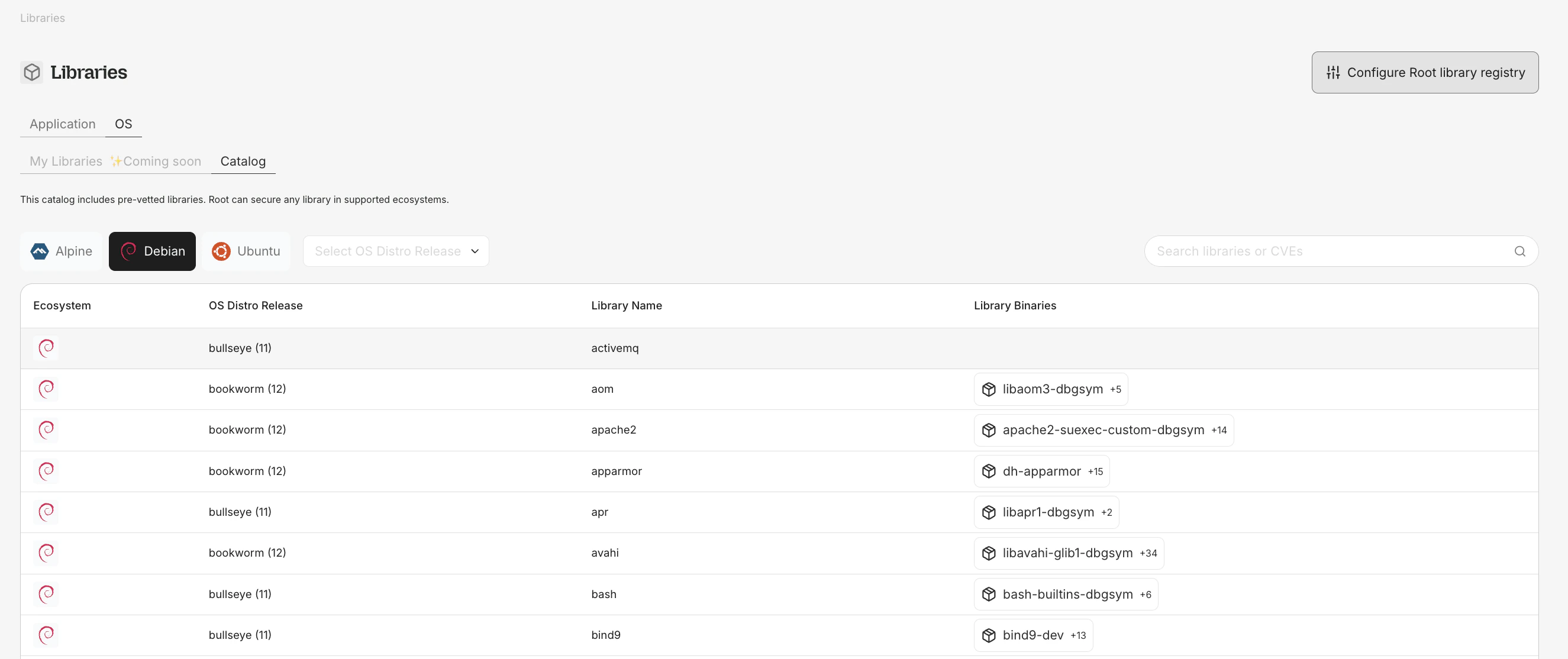 The **OS Libraries** tab (at `app.root.io/libraries/my-os`) shows OS-level packages from your subscribed container images.
### Table columns
* **Source package name** (e.g., `openssl`, `curl`, `libexpat`)
* **Binaries** - binary packages in this source package
* **Ecosystem** - Debian, Ubuntu, Alpine, etc.
* **Distro version** - OS distribution release (e.g., Debian 12, Alpine 3.19)
* **Unfixed CVEs** and **Fixed CVEs** - Critical and High counts
OS package visibility is part of your Root Image Catalog (RIC) entitlement. No separate subscription is required.
### OS package installation
For OS packages with a Root-secured version:
```dockerfile theme={null}
# In Dockerfile
RUN apt-get update && apt-get install -y rootio-curl
```
Or from the command line:
```bash theme={null}
apt-get install rootio-curl
```
Root OS packages use the `rootio-` prefix to distinguish them from upstream packages.
## Filtering and search
My Library supports filtering by ecosystem, package name, and Root availability status. The search bar works across both source names and binary names for OS packages.
The **OS Libraries** tab (at `app.root.io/libraries/my-os`) shows OS-level packages from your subscribed container images.
### Table columns
* **Source package name** (e.g., `openssl`, `curl`, `libexpat`)
* **Binaries** - binary packages in this source package
* **Ecosystem** - Debian, Ubuntu, Alpine, etc.
* **Distro version** - OS distribution release (e.g., Debian 12, Alpine 3.19)
* **Unfixed CVEs** and **Fixed CVEs** - Critical and High counts
OS package visibility is part of your Root Image Catalog (RIC) entitlement. No separate subscription is required.
### OS package installation
For OS packages with a Root-secured version:
```dockerfile theme={null}
# In Dockerfile
RUN apt-get update && apt-get install -y rootio-curl
```
Or from the command line:
```bash theme={null}
apt-get install rootio-curl
```
Root OS packages use the `rootio-` prefix to distinguish them from upstream packages.
## Filtering and search
My Library supports filtering by ecosystem, package name, and Root availability status. The search bar works across both source names and binary names for OS packages.