

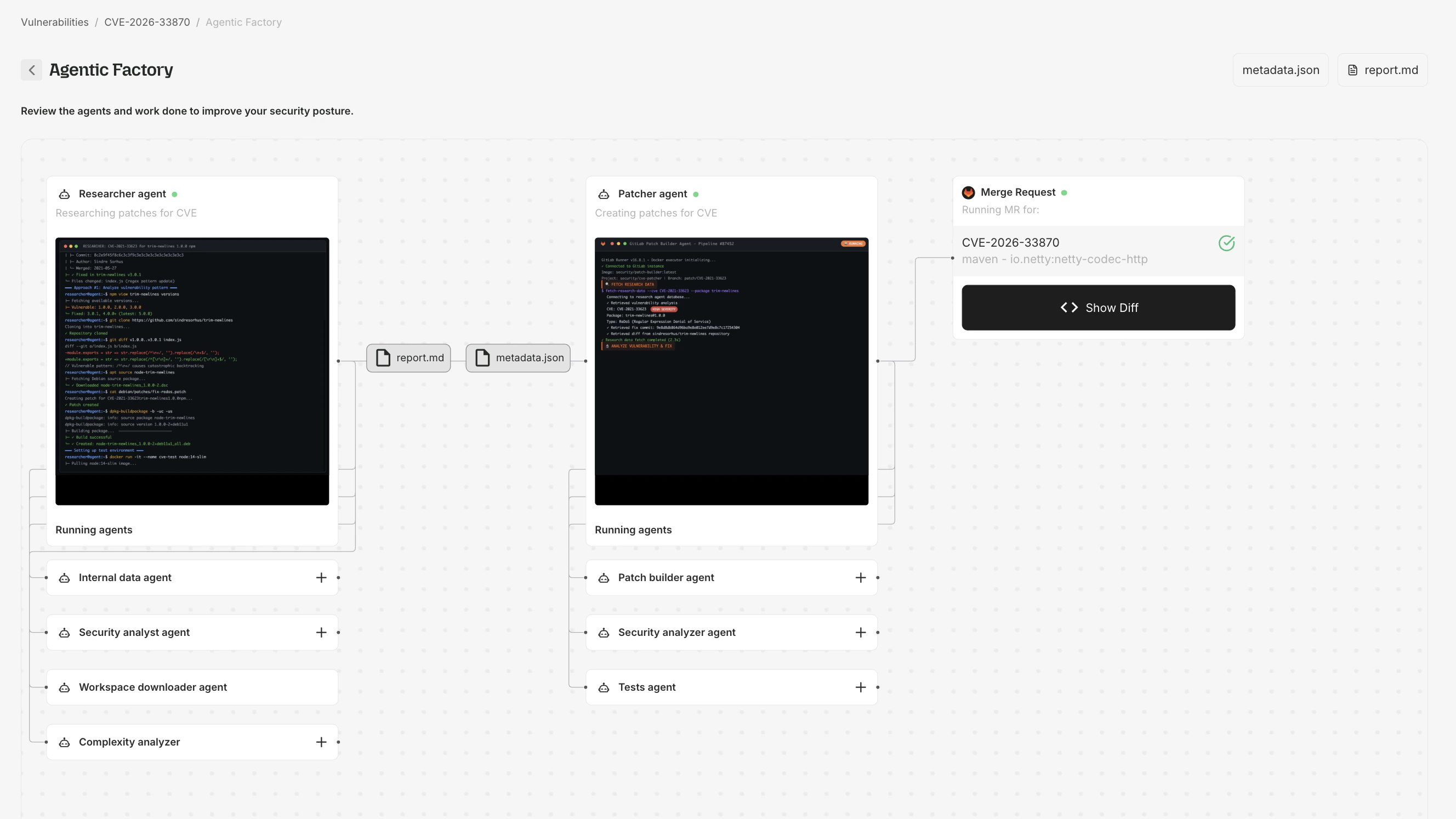
The Agentic Factory view for a single CVE — Researcher agent, Patcher agent, and the resulting Merge Request, with report.md and metadata.json artifacts.
The AVR pipeline
Root’s Agentic Vulnerability Remediation operates in five stages. The Patcher Flow visualization shows each stage as it executes:- Scan and detect — when a new CVE is published, Root ingests vulnerability data (NVD advisories, upstream commit history, exploit databases) and identifies affected components automatically.
- Build a remediation plan — research agents analyze the vulnerability in depth, locate upstream fixes, assess compatibility with the specific versions you’re running, and determine the right fix approach (backport vs. native package upgrade).
- Apply the fix — patching agents generate the fix for the exact version you’re running. Root patches existing software rather than rebuilding from source, preserving your dependencies.
- Test and validate — the patched artifact is validated against the package’s test suite, functional tests, CVE-specific regression tests confirming the exploit is blocked, and compatibility verification.
- Rebuild and deliver — the validated artifact is rebuilt with the patch applied, signed with cryptographic attestations (SBOM, VEX, provenance), and published to Root’s registries.
Viewing the patching flow
From a CVE Details page
- Navigate to any CVE Details page.
- If Root has generated a patch, click Show in Agentic Factory.
From the Patcher Flow page
Navigate directly toapp.root.io/patcher-flow:
1
Select a CVE
Enter the CVE ID, package name, package version, and ecosystem. The form validates that the CVE exists and has artifacts.
2
Watch the agent flow
The visualization animates each agent step. Click the info icon on any node for details.
3
Inspect artifacts
Click artifact buttons to view:
- Patch diff - the code changes applied
- Research report (
report.md) - the Security Analyst’s findings - Metadata (
metadata.json) - structured data about the fix
SLA and processing
Root’s remediation SLA timelines begin when both a CVE is published and a Fix Candidate is available in the ecosystem. There are two tiers: Standard SLA (included with all paid subscriptions):
Enhanced SLA (available at additional charge per Order Form):
For full SLA details including exclusions and surge conditions, see Root’s Service Level Agreement.
CVEs in images or libraries not subscribed by any active customer are tracked but do not trigger automatic agent runs.
Artifacts
If a CVE was resolved by an upstream fix rather than a Root-generated patch, artifacts may not be available.