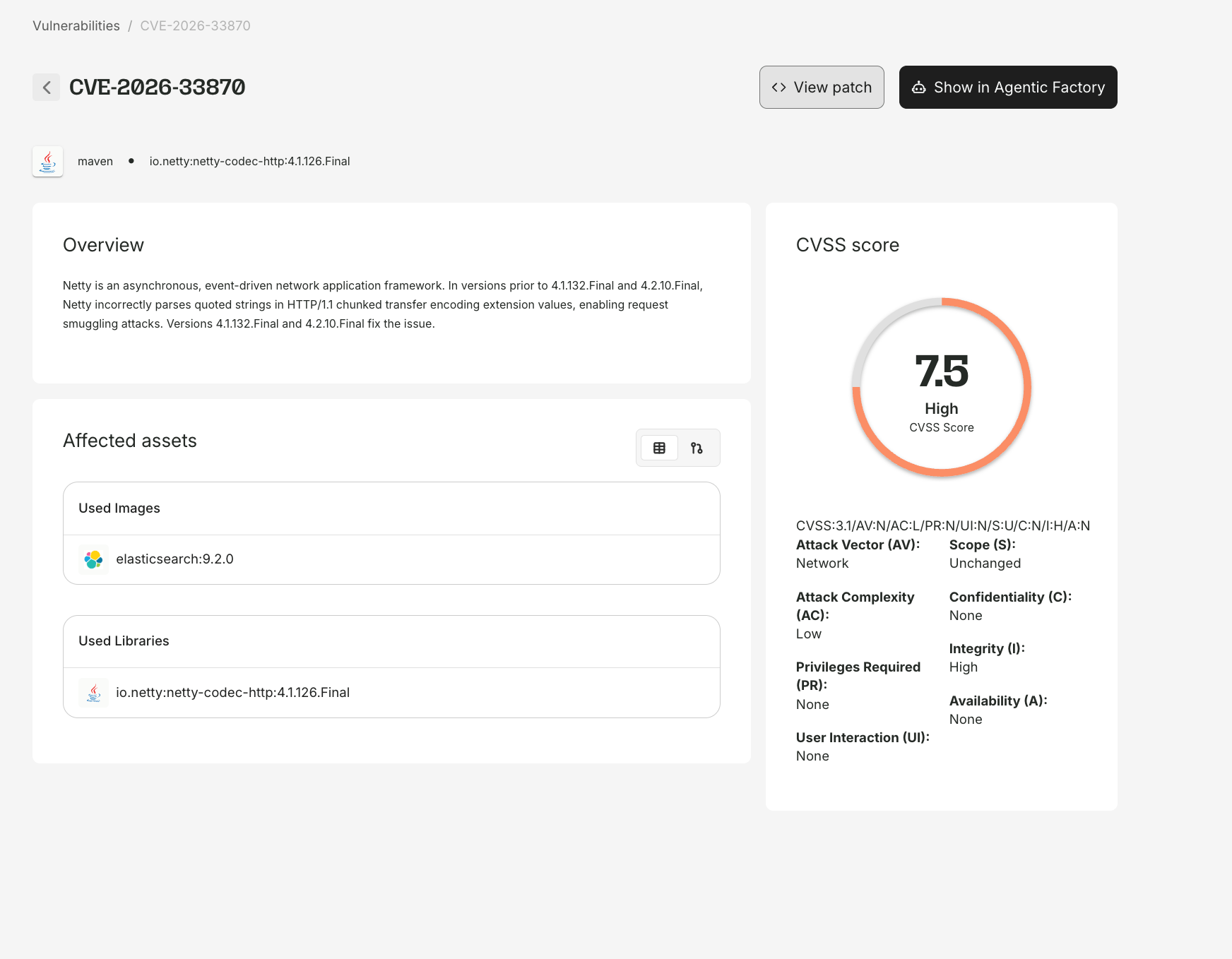
The CVE Details page gives you a comprehensive view of any vulnerability - severity, affected assets, patch status, and the full remediation timeline. Access it by clicking any CVE ID throughout the platform.

CVE metadata

The top of the page shows:
FieldDescription
CVE IDe.g., CVE-2024-45492
SeverityCritical, High, Medium, or Low
CVSS ScoreNumeric score and vector string
DescriptionSummary of the vulnerability
Published dateWhen the CVE was publicly disclosed
Discovered dateWhen Root first detected it

Patch status and actions

If Root has generated a patch, two action buttons appear:
  • Show Patch - view the actual code diff
  • Show in Agentic Factory - open the animated Agentic Patching flow
These buttons appear only for CVEs with Root-generated patch artifacts. CVEs resolved by upstream fixes show resolution status without patch artifacts.

Remediation statuses

StatusMeaning
FixedRoot has resolved this CVE. A patched package or image is available.
Working on a PatchRoot’s agents are actively generating a fix.
No Fix AvailableNo applicable fix exists. Root continues monitoring.

SLA tracking

SLA StatusMeaning
MetResolved within the SLA window
X days remainingActively being worked within SLA
X days past SLAOverdue, Root is prioritizing
Pending SLASLA assignment in progress

Affected assets

List view

A table listing each affected package, its ecosystem, which subscribed images contain it, and the fix status.

Graph view

Toggle to graph view for a visual map:
  • CVE node at the center
  • Package nodes showing which packages contain the vulnerability
  • Image nodes showing which subscribed images include those packages
The graph is interactive - click nodes for details, zoom and pan for complex dependency trees.
The graph view is most useful for CVEs with broad impact across multiple packages and images. For a CVE in a single package, the list view is more practical.

How to get here

CVE IDs are clickable throughout the platform:
FromHow
Security FindingsClick any CVE ID
Image ReportClick a CVE in any tab
Library ReportClick a CVE in the vulnerability table
My LibraryNavigate to a package report, then click a CVE
Direct URLapp.root.io/vulnerabilities/CVE-YYYY-NNNNN

Public vs. logged-in views

  • Public visitors see CVE metadata, general affected packages, and Root’s remediation status.
  • Logged-in users additionally see organization-specific affected assets, SLA status, patch artifacts, and the Agentic Factory visualization.