

How package discovery works
When your organization connects artifact repositories or subscribes to container images, Root automatically scans for packages in use:- Identifies the package name, version, and ecosystem
- Scans for known CVEs
- Checks whether a Root-patched version exists
- Tracks the package with its vulnerability status
Package discovery is continuous. As you push new packages or update dependencies, Root detects and tracks them automatically.
Application libraries
The Application Libraries tab shows packages from your connected artifact repositories across Python (PyPI), JavaScript (npm), Java (Maven), and Go (Go modules).Table columns
Package statuses
Getting the fixed package
Click Get the fixed package to open a modal with the Root-patched version number, installation commands per package manager, and project file snippets. You can also click View in Catalog to see the full package page in the Library Catalog.Package reports
Click View Report to see a Library Report:- CVE breakdown - Critical and High vulnerabilities, with a toggle for Medium and Low
- Before/after comparison - CVEs in upstream vs. Root-patched version
- Individual CVE details - click any CVE ID to open the CVE Details page
OS libraries
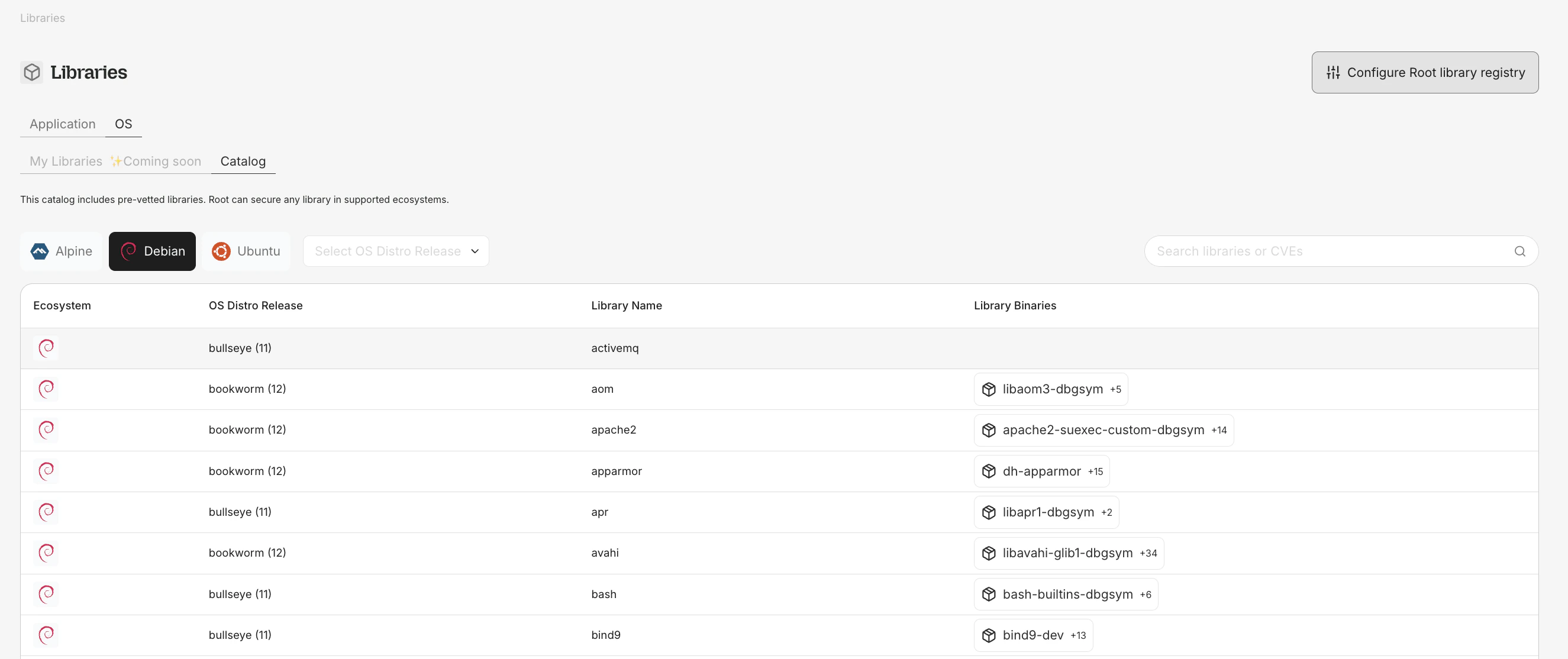
OS Libraries — browse source packages and binaries across Alpine, Debian, and Ubuntu distributions.
app.root.io/libraries/my-os) shows OS-level packages from your subscribed container images.
Table columns
- Source package name (e.g.,
openssl,curl,libexpat) - Binaries - binary packages in this source package
- Ecosystem - Debian, Ubuntu, Alpine, etc.
- Distro version - OS distribution release (e.g., Debian 12, Alpine 3.19)
- Unfixed CVEs and Fixed CVEs - Critical and High counts
OS package visibility is part of your Root Image Catalog (RIC) entitlement. No separate subscription is required.
OS package installation
For OS packages with a Root-secured version:rootio- prefix to distinguish them from upstream packages.