Root works with Wiz out of the box. Use wizcli docker scan to compare the vulnerability posture of any upstream image against its Root-patched equivalent.

Prerequisites

Scanning Root images

Pass any cr.root.io image reference directly to wizcli docker scan:
wizcli docker scan --image cr.root.io/<image>:<tag>

Before and after Root

The example below scans node:25.0.0 from Docker Hub alongside its Root equivalent. Upstream (Docker Hub):
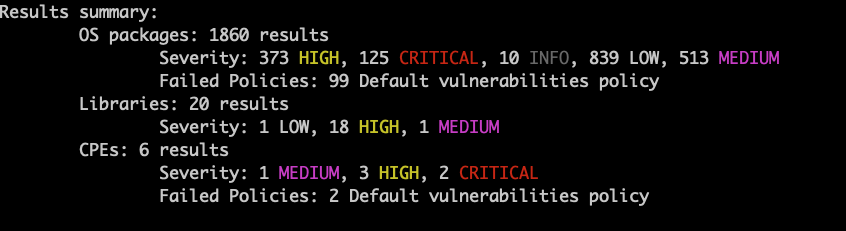
wizcli docker scan --image node:25.0.0
Wiz scan results for node:25.0.0 from Docker Hub
Results summary:
    OS packages: 1860 results
        Severity: 373 HIGH, 125 CRITICAL, 10 INFO, 839 LOW, 513 MEDIUM
        Failed Policies: 99 Default vulnerabilities policy
    Libraries: 20 results
        Severity: 1 LOW, 18 HIGH, 1 MEDIUM
    CPEs: 6 results
        Severity: 1 MEDIUM, 3 HIGH, 2 CRITICAL
        Failed Policies: 2 Default vulnerabilities policy
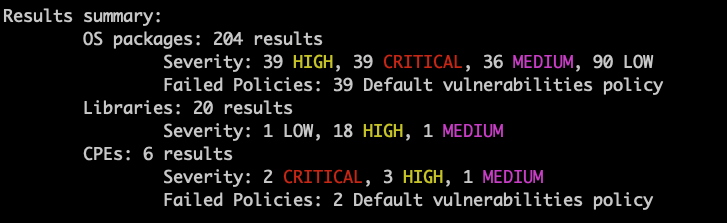
Root (cr.root.io):
wizcli docker scan --image cr.root.io/node:25.0.0
Wiz scan results for cr.root.io/node:25.0.0
Results summary:
    OS packages: 204 results
        Severity: 39 HIGH, 39 CRITICAL, 36 MEDIUM, 90 LOW
        Failed Policies: 39 Default vulnerabilities policy
    Libraries: 20 results
        Severity: 1 LOW, 18 HIGH, 1 MEDIUM
    CPEs: 6 results
        Severity: 2 CRITICAL, 3 HIGH, 1 MEDIUM
        Failed Policies: 2 Default vulnerabilities policy
node:25.0.0 (Docker Hub)cr.root.io/node:25.0.0 (Root)
OS packages found1,860204
CRITICAL12539
HIGH37339
MEDIUM51336
LOW83990
Failed policies (OS)9939
Root patches OS-level vulnerabilities directly into the image layers. Library and CPE findings are the same in both scans — those come from your application dependencies, not the base OS.

CI/CD

Add a scan step to your pipeline to gate on policy failures: GitHub Actions:
- name: Scan image with Wiz
  run: wizcli docker scan --image cr.root.io/node:25.0.0
  env:
    WIZ_CLIENT_ID: ${{ secrets.WIZ_CLIENT_ID }}
    WIZ_CLIENT_SECRET: ${{ secrets.WIZ_CLIENT_SECRET }}
GitLab CI:
wiz-scan:
  stage: test
  variables:
    WIZ_CLIENT_ID: $WIZ_CLIENT_ID
    WIZ_CLIENT_SECRET: $WIZ_CLIENT_SECRET
  script:
    - wizcli docker scan --image cr.root.io/node:25.0.0
For policy enforcement, failure thresholds, and output formats, see the Wiz CI/CD integration docs.

Troubleshooting

IssueSolution
401 Unauthorized pulling from cr.root.ioVerify your Root token is valid — see Authentication
wizcli not authenticatedRun wizcli auth and confirm your Wiz credentials are set
Scan returns no resultsConfirm the image was pulled successfully before scanning